
In this article you can find information related to our recent releases.
- Release 21/10/2026
- Release 22/09/2026
- Release 08/09/2026
- Release 26/08/2026
- Release 30/06/2026
- Release 04/06/2026
- Release 07/05/2026
- Release 30/03/2026
- Release 10/02/2026
- Release 15/01/2026
- Release 18/11/2025
- Release 21/10/2025
- Release 30/09/2025
- Release 27/08/2025
- Release 03/07/2025
- Release 05/06/2025
- Release 13/05/2025
- Release 04/03/2025
- Release 28/01/2025
- Release 19/11/2024
Release 21/10/2026
Convert an NPS, CES or CSAT question to a custom metric
You can now change a standard metric question into a custom metric with the same score range. The question itself stays the same, so all historical answers stay attached to it. Dashboards, alert rules, conversations and Analysis all follow the converted question.
- To do this, go to Edit question > Change metric, choose one of the custom metrics with the same range, and confirm. If the custom metric you want to convert your standard metric to doesn't exist yet, create it first.
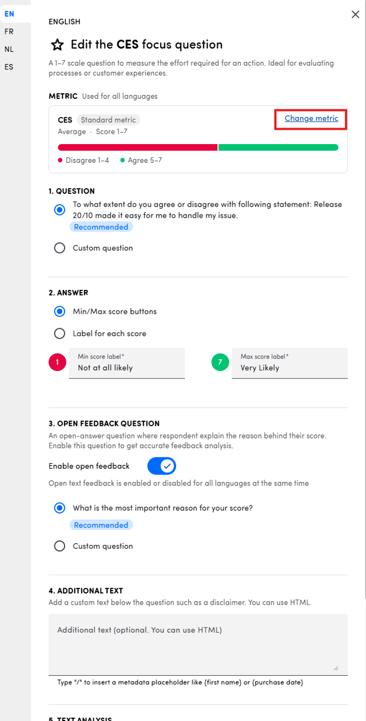
- The conversion only goes one way. You can’t convert back, convert from one custom metric to another, or change the score range.
- Historical results are recalculated overnight, so dashboards will look right the day after you convert. Therefore, we recommend converting at the end of your working day.
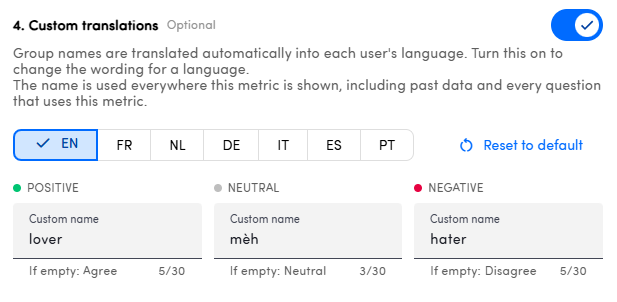
Custom metric group names in every language
You can now give your custom metric score groups (e.g. “Promoters”) their own name in every user language, up to 30 characters each. You can still edit them after the metric has received answers. If you leave a name empty, the default group name is used.
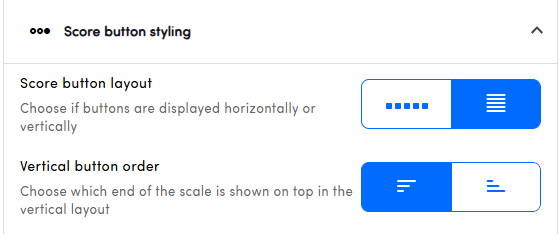
Choose the order of vertical score buttons
In survey design, under button display, you can now choose whether vertical score buttons run high → low or low → high. The setting applies to the survey page, the e-mail invitation and the preview, for every button-based score (NPS, CSAT, CES and custom metrics). Only the way the buttons are shown changes. Scores you’ve already collected stay the same.
Reply templates in every touchpoint language
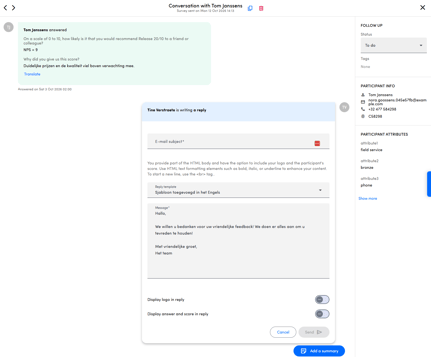
Reply templates now have a name and text for each touchpoint language, the same way auto-responders do. Only the first touchpoint language is required. When you save, any empty language is machine-translated and marked as such until someone reviews it.
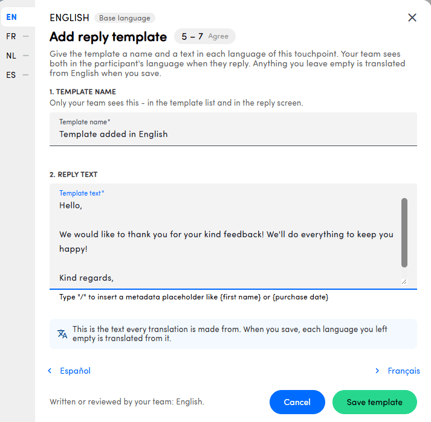
When you reply to a customer from conversations, the template in the participant’s language is used automatically.
Customer Interactions: switch off summarisation
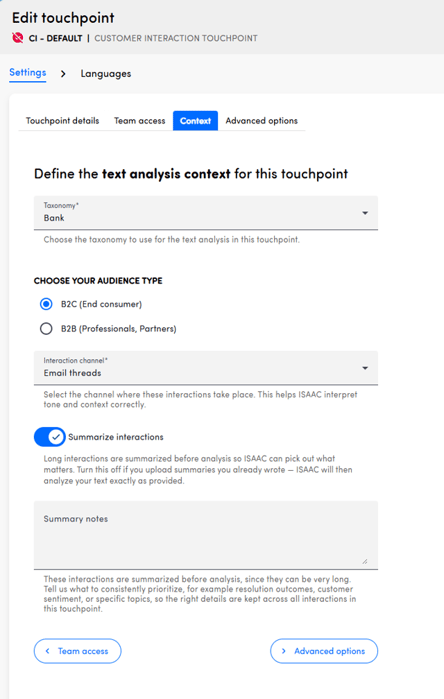
Customer Interaction touchpoints have a new Summarize interactions setting, which is on by default. If you switch it off, interactions are no longer summarised and you see the original text instead. This is handy when you upload summaries your agents have already written.
Better privacy for anonymous touchpoints
In an anonymous touchpoint, any participant attribute you’ve marked as PII is now hidden everywhere: in conversation details, filters, exports and the API. On non-anonymous touchpoints these attributes stay visible, and they reappear if you remove the PII flag.
Cleaner data: spam-bot answers filtered out more reliably
If you show partial answers, we now detect bot answers more accurately and hide them, including in your historical data. Completed surveys are never hidden.
Smaller improvements
- Hover over a navigation icon to see the name of that section.
- You can now replay the guided tours (Prioritize, Ask Isaac) whenever you like.
- The “Specify” text of a multiple-choice Other option is now included in answer exports and can be uploaded through the platform, the API and FTP.
- The Get Answers API endpoint now returns the question ID with each prediction.
Release 22/09/2026
This release is all about how your surveys look and read, plus a few improvements to make your dashboards and alerts easier to work with.
Format your survey question text
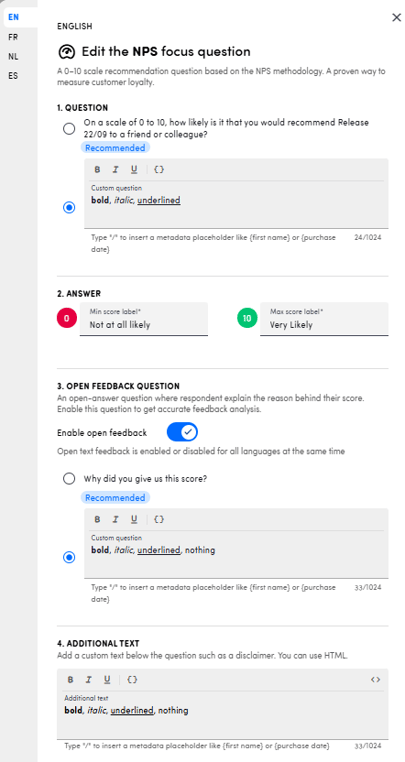
You can now apply bold, italic and underline directly to your question text. Use it to emphasise the part of the question that matters: a brand name, "this delivery", or the period you're asking about.
-
Formatting is available on your question text (including the custom question for NPS, CES and CSAT), the custom open feedback question, and the additional text — and you can style each language separately.
-
For additional text, a new
</>button lets you switch to source view and edit the underlying HTML directly, replacing the plain text field that was there before.
Give your survey pages a name and an introduction
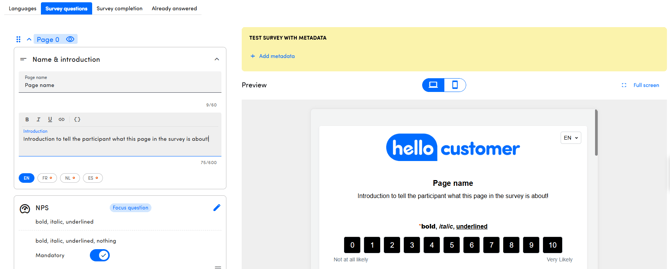
Building a survey across several pages? You can now give each page its own name and a short introduction. Participants get the context for the questions on that page and feel more personally addressed. Both are optional, so surveys that don't need them stay clean and simple.
Match your buttons to your brand
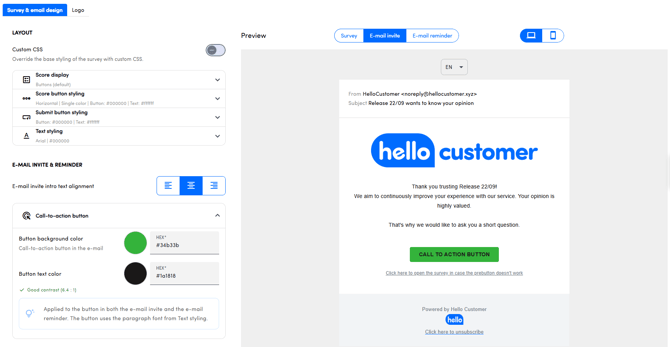
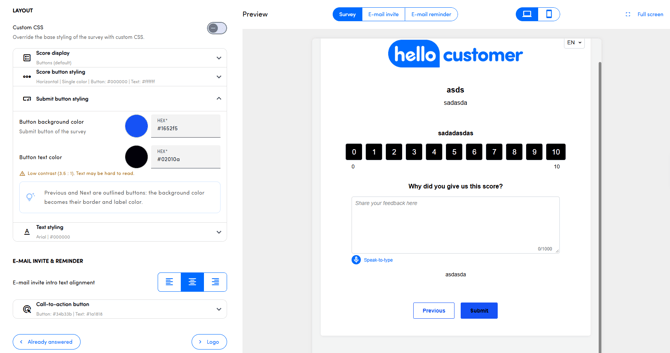
You can now choose the colour of the call-to-action button in your invitation and reminder emails, and of the submit button in your survey. You'll find this under Design > Survey design.
- Call-to-action button
- Submit button
Jump straight from an alert to the conversation
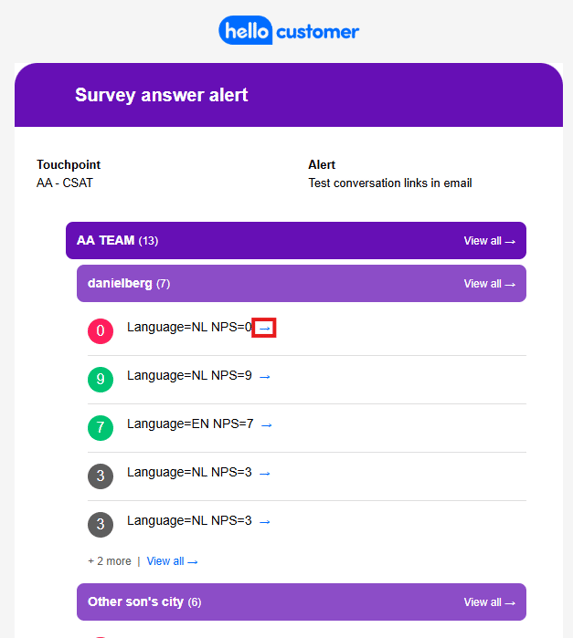
Every piece of feedback in an answer alert now includes a link to the detailed answer view in the Conversation manager. One click takes you from the alert to the full conversation, instead of searching for it.
Release 08/09/2026
More control over who receives your surveys and a faster way to pick a date period. Here's what's new:
Unsubscribe a participant yourself
Admins can now unsubscribe participant themselves in Account settings. The address stops receiving invitations and reminders for every touchpoint immediately, and you can re-subscribe it just as easily. Unsubscribed participants are listed with the reason and the date they opted out, and their earlier responses are always kept.
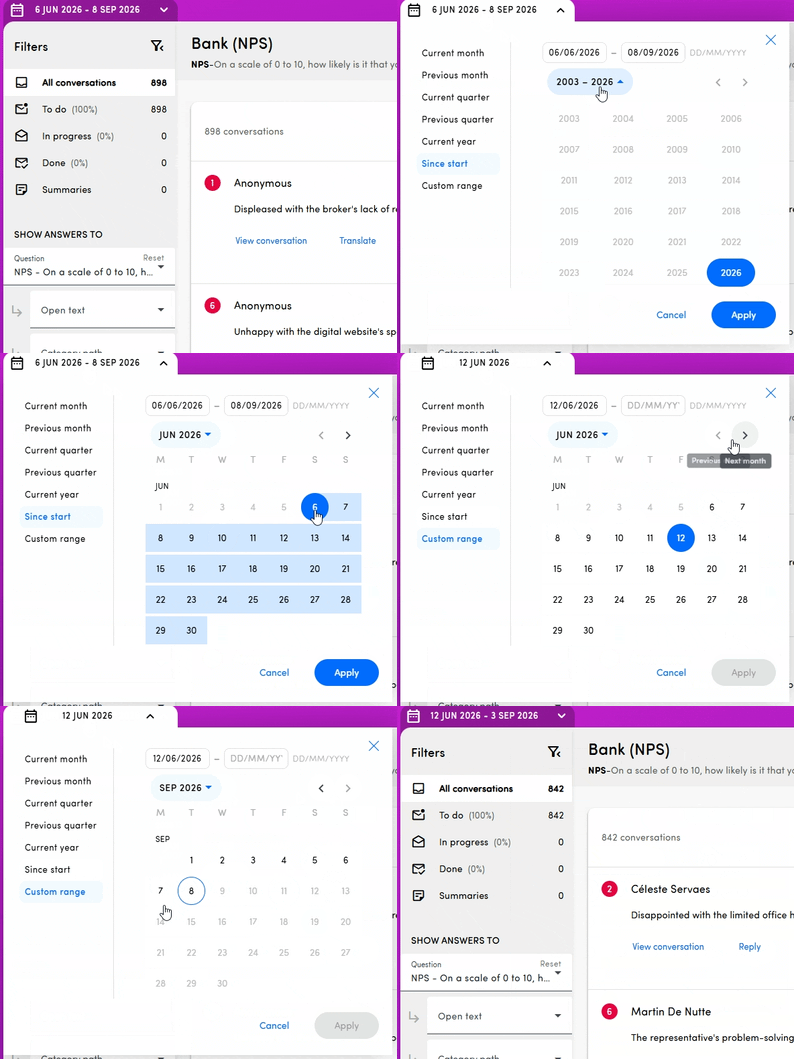
A faster date picker
Selecting a date period no longer takes a dozen clicks. The reworked picker introduces a more user-friendly way to select dates that are further back in the past.
The survey preview stays with you
When you build a long survey in Questions & Text, the preview now stays on screen as you scroll, so you can see what you're editing on page six without scrolling back to the top.
.gif?width=668&height=343&name=Recording%202026-09-08%20at%2016.16.44%20(1).gif)
Release 26/08/2026
A big one: Ask Isaac for your whole team, replies you can generate or template in Conversations, and a set of survey-building improvements. Can't find some of the new features? Contact support@hellocustomer.com or contact your Customer Success Manager.
Here's what's new:
Ask Isaac is now open to all users
Ask Isaac is no longer admin-only. Every user can ask questions, and answers stay limited to the data that user's teams are allowed to see — you decide per team who gets access. Isaac also shows what it's working on while you wait, understands your team aliases and metadata display names as you see them in the platform, and can answer questions about your own verbatim and Ask Isaac usage.
Learn more in the Ask Isaac and Team permissions articles.
Reply to feedback faster: AI-generated replies and templates
In the Conversation manager you can now have a reply generated with AI, based on the score, the question and the customer's comment. You set the guidelines that steer it — tone, length and your own instructions — in the touchpoint wizard. You can also prepare draft reply texts per score range and start a reply from one of those instead of writing from scratch. Replies already sent to a Google review can now be edited and saved again as well.
Learn more in this article.
Easier survey building
- Reorder whole survey pages by drag & drop, instead of moving questions one by one.
- Multiple choice and matrix answer options can be reordered by drag & drop too — so you no longer have to re-enter options and lose the historical answers attached to them.
- Multiple choice questions can get an optional "Other" option, where the respondent fills in their own answer. What they type is visible in Conversations.
More control over invitation timing and redirects
You can set a custom delay, in hours and up to two weeks, between uploading participants and the moment the invitation goes out. And you can now choose how many seconds respondents see the thank-you page before being redirected to your own URL.
Custom metrics in report emails
Report emails now support the metric score, score repartition and score evolution widgets, with widget titles in each recipient's language. Custom metrics are included, not just the standard ones.
Learn more in the Reports article.
Customer interactions: choose what you upload and how it's summarized
If you use the customer interactions touchpoint, you can now select which type of interaction you upload and customize how those interactions are summarized before they go into the text analysis. Very short texts are no longer summarized.
Learn more in the Customer interactions touchpoint article.
Release 30/06/2026
A smoother login and more control over your dashboards and messages. Here's what's new:
A more secure login
You may have already noticed it when signing in just now : we've moved to a new login experience that's more secure. Nothing for you to set up.
Unsubscribe link in autoresponders
Autoresponder messages now always include an unsubscribe link in the footer, so recipients can opt out directly. Participants who unsubscribe via the autoresponder will no longer receive invitations to new surveys.
Dashboard widget names in every language
In addiction to questions and answer options, you can now also define widget titles in all your platform languages, so every user sees the dashboard in theirs. Find more in Dashboards - Create and edit dashboards .
Easier authentication for Google touchpoints
Connecting a Google Review touchpoint is now easier with a new authentication flow in the wizard. You can find all the information here: Google review touchpoint - Add Google reviews to the Hello Customer platform
See your full platform usage
The Platform usage menu now shows your users, touchpoints and languages, alongside your verbatim limit (if applicable in your contract), so you can track your plan at a glance. More information here: Account Settings and Profile
Manage dashboard permissions via Excel
Not only your team structure, users and permissions can be updated via an Excel upload. Dashboard permissions can now be updated in bulk this way too, on top of managing them in the platform. Find the updated information in Teams: Bulk Management via Excel Round-Trip
Release 04/06/2026
A focused release with three headline updates: a smarter Ask Isaac, AI-generated improvement recommendations on dashboards, and stars as a visualization for score questions.
A smarter Ask Isaac
Ask Isaac has had a full refresh. It now answers your questions even better, sources its answers more clearly, and has had a round of accuracy and stability fixes alongside.
Learn more in the Ask Isaac article.
Recommendations widget
A new dashboard widget surfaces AI-generated improvement recommendations based on what your customers ask for in their open-text feedback. The widget only shows recommendations when there is enough data (a minimum-sample threshold prevents weak or unreliable suggestions).
Learn more in the Dashboards article, under the Advanced Widgets section.
Stars as a visualization for score questions
Score questions can now be displayed as stars instead of numeric buttons. You choose outlined or filled stars and the colours for both selected and unselected stars, with the style applied per question type. Stars render in the survey and in e-mail invitations, including legacy Outlook. Configure under the Score Display accordion in the Survey Design tab of the Touchpoint Wizard.
Learn more in the Star score visualization article.
Release 07/05/2026
Release 30/03/2026
This is a big one! From smarter survey design to bulk team management and stronger data privacy controls, this release brings a wide range of improvements across the entire platform.
Team Bulk Management: Excel Round-Trip
Managing large teams just got a lot faster. You can now export your full team hierarchy as an Excel file, make bulk changes: rename teams, reorganize subteams, update members, adjust permissions; and upload the file back to apply all changes at once.
Before anything is applied, a preview shows you exactly what will change. Updates are all-or-nothing, so your data stays consistent, and clear error messages let you fix issues before committing.
You can access this workflow directly from the team overview page.
Matrix Questions
Surveys now support a new question type: Matrix questions. These allow you to group multiple related sub-questions into a single grid, making it easier for participants to rate several items side-by-side. Perfect for satisfaction ratings across different services, product attributes, or team performance.
Matrix questions are available in the touchpoint wizard, display correctly on both desktop and mobile, and are fully supported in the data warehouse and analytics pipeline. You can also upload them in bulk using a dedicated template.
Richer Feedback in Alerts & Notification Emails
Alert emails now include much more context. In addition to scores, you'll see open-text responses and all relevant survey answers directly in the alert. You can configure how many feedback items are shown (default: 3) and toggle the feature on or off per alert. The email layout has also been redesigned for better readability.
Page Logic Enhancements
Page logic is now even more flexible. Two new capabilities have been added:
Show a page only when a metadata field is empty; useful for collecting missing information without asking everyone.
Skip directly to any page or to the end of the survey, regardless of previous answers. Ideal for fast-tracking certain participants or skipping irrelevant sections.
These options combine with existing metadata conditions, so you can build complex, multi-rule flows without any coding.
Category Level View (CLV)
Working with complex taxonomies is now more reliable. You can filter by multiple categories at once across Analysis, Conversations, Dashboards, KDA, and Team Ranking. Category path trees are now consistently translated, and several UX fixes ensure that filters reset correctly and category lists always display the right data.
"What's New" Pop-Up & Feedback Button
Admin users now see a built-in "What's New" channel on the homepage, so you're always up to date with the latest features. A new Feedback button is also available throughout the app, making it easy to share thoughts without leaving the platform.
Release 10/02/2026
We're back again with a new release, and this one is improving the previously introduced Custom Metrics and Ask Isaac!
Custom Metrics: Custom calculations
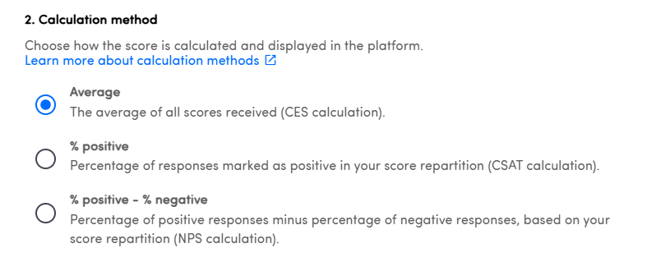
You can now add the type of calculation you want for your custom metrics. Before they only calculated the Average of the scores, now you can change this and select two other calculations:
% of positive answers (CSAT-like calculation)
% of positive answers - % of negative answers (NPS-like calculation)
This additional feature makes Custom Metrics even more customizable!
You can find more information here.
Ask Isaac: Multiple chats
Isaac supports now creating new chats, so you can keep your conversations independent. You can also rename the tabs and remove the ones you don't want anymore. Keep your thoughts and conversations organized!
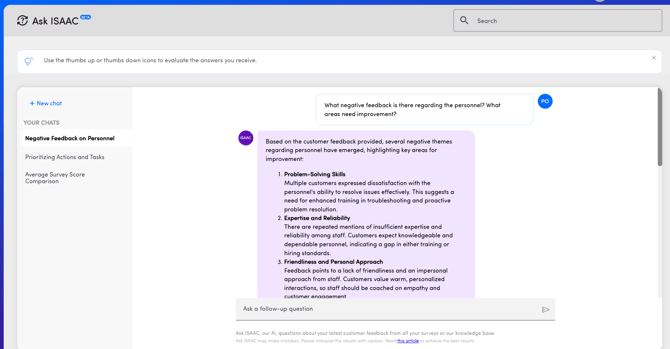
You can find all the information in this article.
Release 15/01/2026
We’ve introduced Custom Metrics, a new metric question type that gives you full control over how scores are defined and presented. You can configure score ranges, groupings, polarity (positive to negative or the reverse), and the display order of score buttons. This flexibility unlocks new measurement use cases and enables more precise data collection across your surveys.
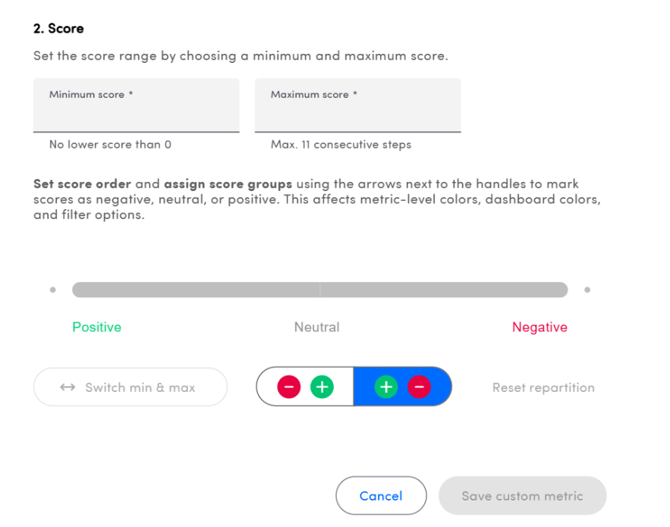

Learn how to configure and use Custom Metrics in this article.
Release 18/11/2025
- Manual upload within the platform
- Upload via our FTPs server
- Upload through an API call
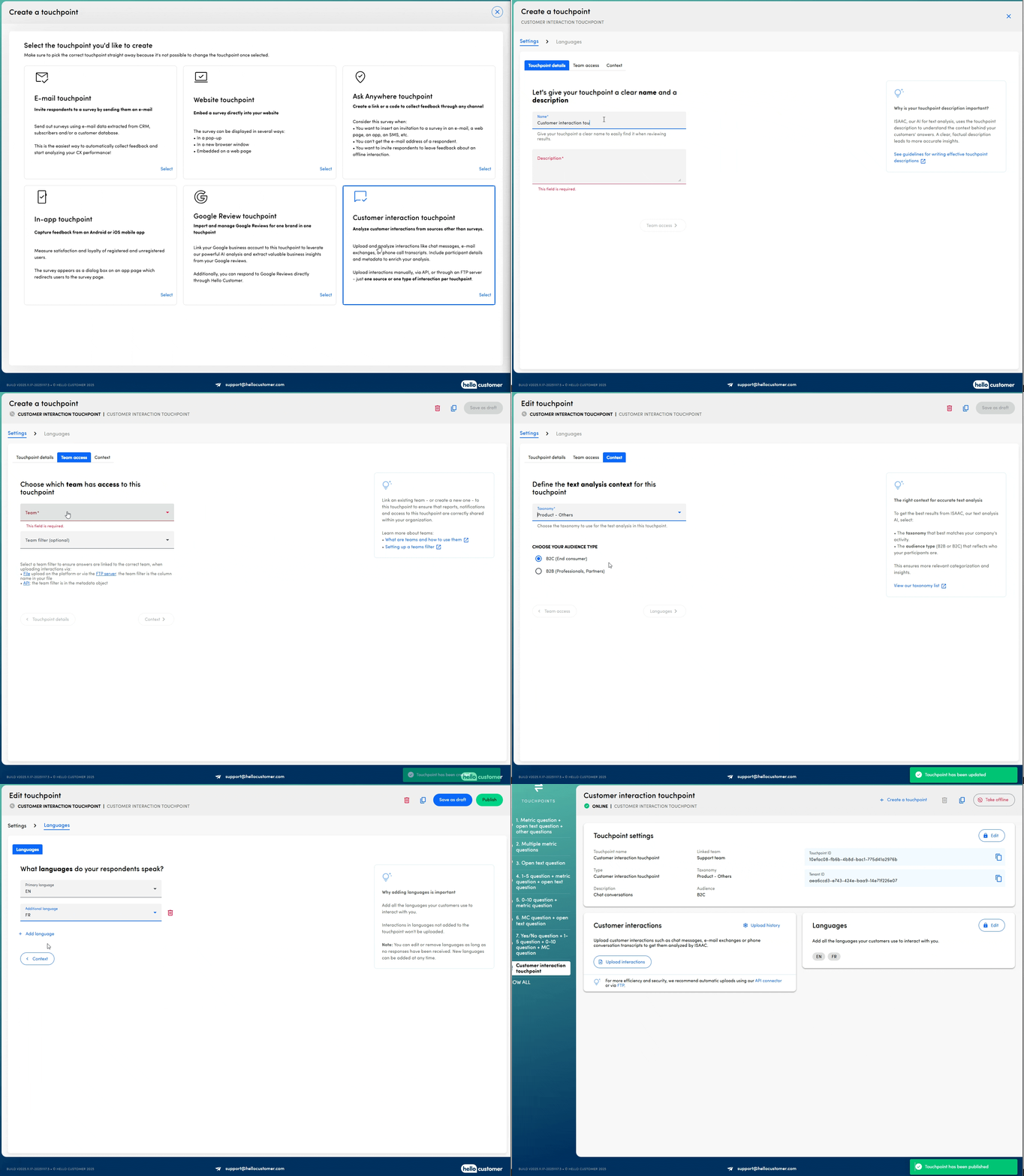
To create this new touchpoint type, it must first be activated within your environment, and you’ll need to be using the latest version of ISAAC. Please contact your Customer Success Manager or email support@hellocustomer.com for more information.
More information about this touchpoint can be found in this dedicated article.
API-driven team management
Managing your team structure no longer requires manual updates in the platform. With the latest API endpoints, you can now:
- Create new teams
- Remove teams
- Edit team names and aliases
- Adjust the parent team for organizational restructuring
- Retrieve a team’s permission settings
- Update permissions for any team
For complete guidance on leveraging these new APIs, please refer to our detailed article or explore our Postman collection.
Release 21/10/2025
We’ve made surveying even more flexible! You can now start your survey with any type of question!
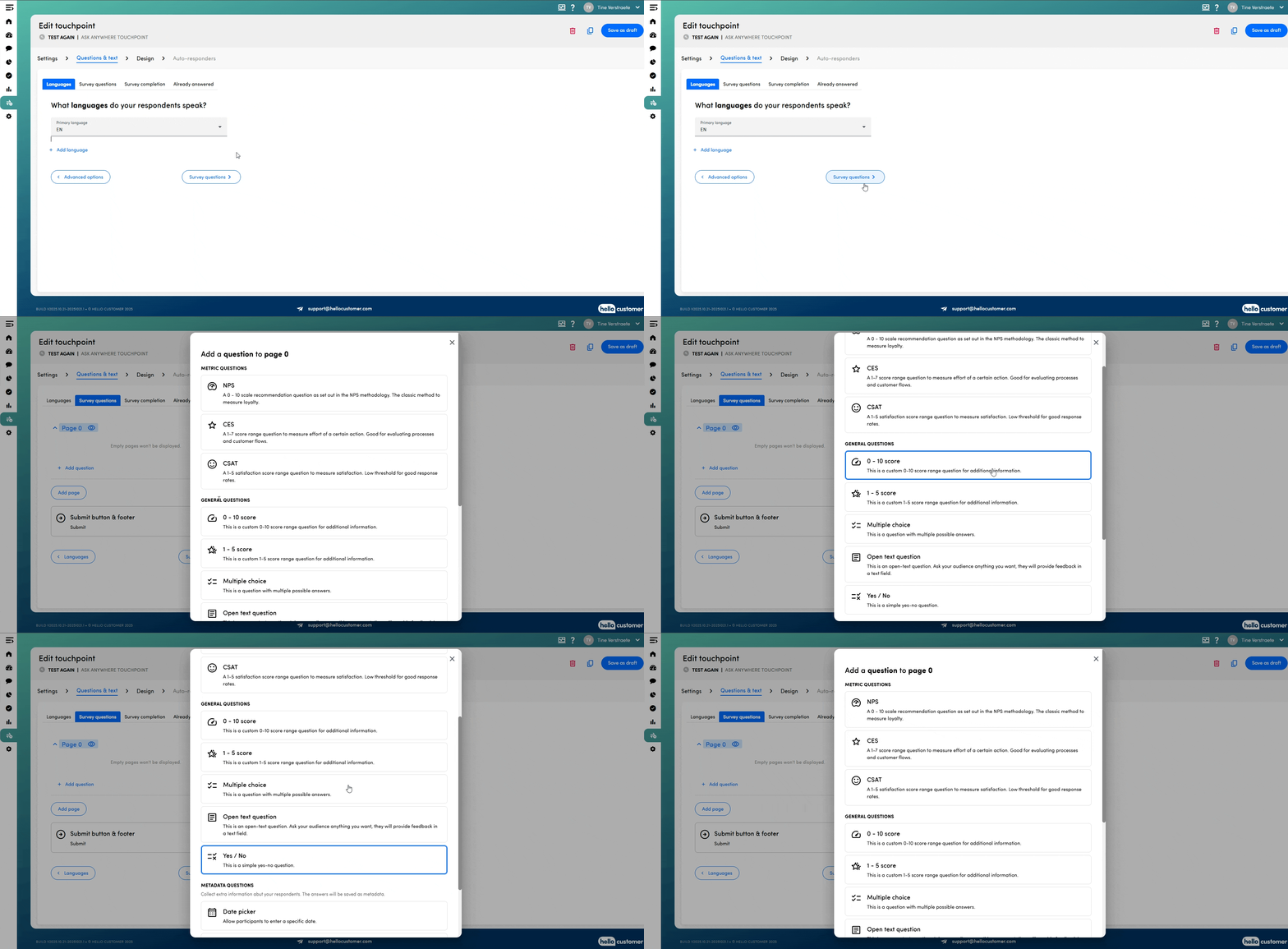
To use this feature, it must first be activated within your environment, and you’ll need to be using the latest version of ISAAC. Please contact your Customer Success Manager or email support@hellocustomer.com for more information.
Release 30/09/2025
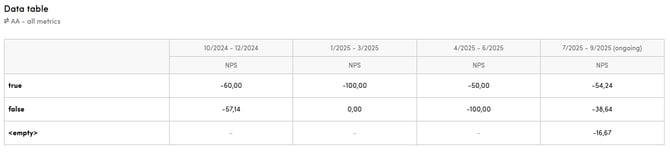
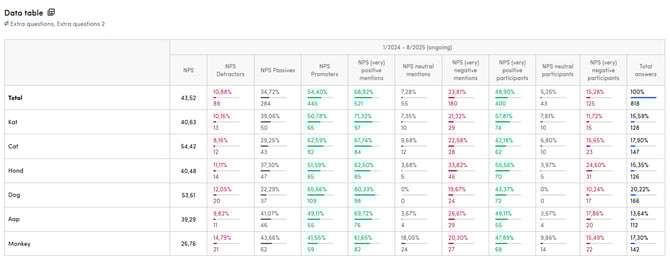
In our previous release, we introduced the data table as a new dashboard widget. Initially, you could only add answers from multiple-choice or yes/no questions as rows.
Moving forward, you can now include values for metadata keys in the rows as well. This enhancement enables you to analyse metrics such as NPS results and sentiment distribution per customer segment directly within the widget.
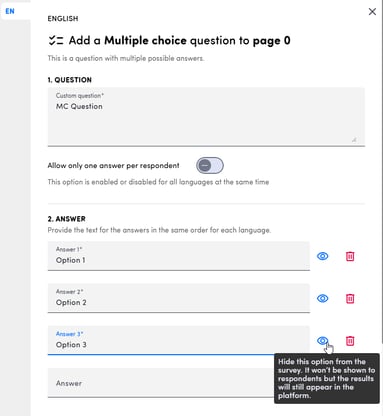
You can now hide an answer option in multiple-choice questions. When an option is hidden, participants will no longer be able to select it. However, the existing results for that option will remain visible in the platform, so you don’t lose past data.
Explore these new capabilities today!
Release 27/08/2025
Brace yourselves for some cool new features!
Data table
A new dashboard widget has arrived: the data table. With this widget, you can display results such as metrics, metric groups, sentiment spread, and totals—broken down per answer in a multiple-choice or yes/no question. You can also add evolution to compare different periods side by side.
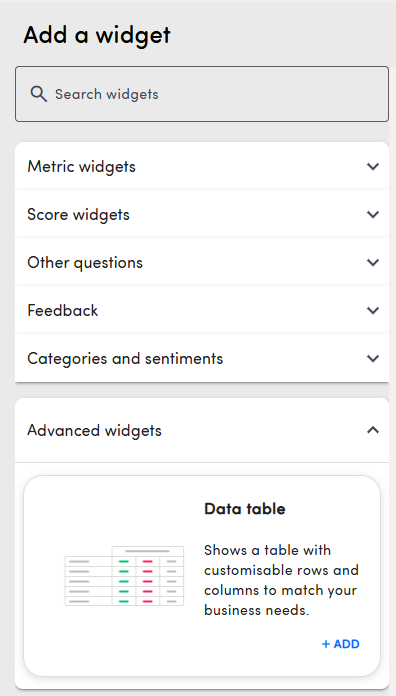
You’ll find this widget under “Advanced widgets” when adding a new dashboard or editing an existing one.
Google review touchpoint
To help you avoid duplicate work, replies added to Google reviews directly on Google or via another tool will now also appear in the Hello Customer platform. This way, you’ll immediately see which reviews already have a response and know when no further reply is needed.
Conversation status rule
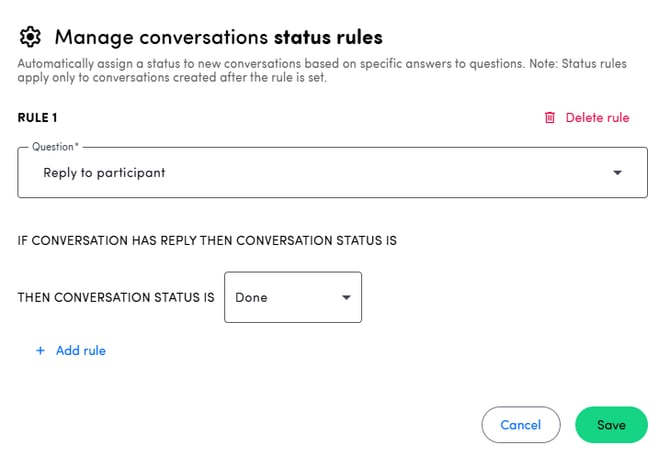
We’ve introduced a new conversation status rule! You can now define the status a conversation should receive once a reply has been added via the Hello Customer platform.
Release 03/07/2025
From now on, it is possible to contact your customers directly from the Hello Customer platform! In conversations, it's possible to send an email to a customer for which the email address is available:
- Configure your subject and email text
- Choose to include the logo and / or the original answer of the customer
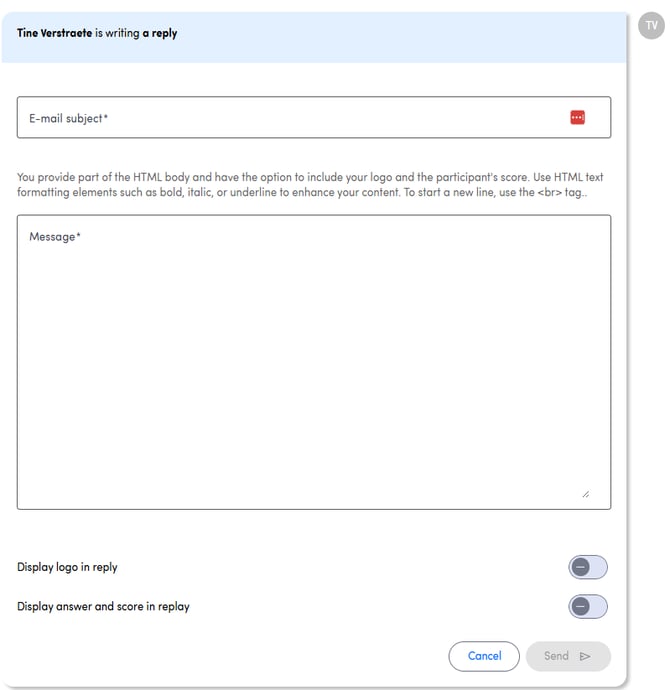
You can send as many emails to your customers as you like. If they reply to your emails, this will appear in the platform as well. More information about this feature can be found here.
Please note that replying to participants directly from conversations is only possible if this functionality is activated in your environment. Contact your customer success manager for more information.
Release 05/06/2025
This release includes a range of new features that we hope you’ll find both interesting and useful!
Google review touchpoint
This is a brand new type of touchpoint which will allow you to integrate your Google reviews in the Hello Customer platform. You can find all you need to know here.
In the near future, it will be possible to reply to the reviews directly from our platform, so stay tuned!
Ask ISAAC
This acclaimed feature is already here!
Ask ISAAC is an intelligent analytics agent which dives deep into your data and gives you clear, actionable answers to your most pressing questions. You can get all the insights on the Ask ISAAC article.
Reports and report mails
- Reports emails now support the Feedback widget.
- Also, the URL from the report email leads directly to the dashboard filtered for the team (if general dashboard filter is enabled)
- An updated version o the configuring page of reports has been implemented.
You can check all these changes here.
New API calls
Two new API calls have been added and can be used.
- Get Delivered - Retrieve a list of all participants who received a survey on a given period of time
- Get Quarantined participant - Check whether a participant is quarantined
You can check the detailed information on our API article.
Release 13/05/2025
We’ve made several powerful updates to our alert and report emails. Here’s what’s new:
Customizable Email Subjects
You can now fully customize the subject lines of alert and report emails. Tailor the subject to each user’s language to ensure clarity and relevance for every recipient.
Add dynamic fields and free text to personalize subjects
Improve open rates by making subject lines more descriptive and user-specific
Multilingual Support Expanded
Previously, our emails were only sent in English and French, even for users whose language was set to Dutch, German, Italian, Spanish, or Portuguese.
Now, emails will be sent in all supported user languages across the platform, ensuring a consistent and localized experience for everyone.
Dashboard Widgets in Report Emails
Make your report emails more actionable: you can now include selected dashboard widgets directly in the email body. Supported widgets:
- Metric scores (NPS, CSAT, CES)
- Top positive and negative categories
⚠️ The first three supported widgets from your dashboard will be included if you enable this functionality. Report content is always scoped to the recipient’s team permissions, so users only see data they’re authorized to access.
Try out these improvements and deliver clearer, more impactful emails to your users!
Release 04/03/2025
We’re rolling out some powerful new features to make your workflow smoother and your insights even more actionable. From multi-touchpoint dashboards to enhanced survey validity settings and improved alert emails, these updates are designed to give you more control and flexibility. Let’s dive in!
Dashboards for Multiple Touchpoints
You can now set up dashboards that display data from multiple touchpoints! This feature is useful in several scenarios:
-
Compare multiple touchpoints in one dashboard:
For example, if you want to analyze a customer journey, you can add widgets for different touchpoints and compare their scores side by side.
-
Combine data from various sources:
If you’re using an "Ask Anywhere" touchpoint to upload historical data and collecting new responses through an email touchpoint, you can now consolidate this information into a single dashboard.
Learn how to create a dashboard for multiple touchpoints here.
Survey Validity Setting
With the new survey validity feature, you can define how long participants have to complete a survey after receiving the e-mail invitation. The validity period can be set between 1 day and 6 months.
During the validity period:
- Participants can start filling out the survey.
-
If they don’t complete it in one go, they can reopen it and continue at a later time.
Please note that if partial answers are shown in the platform, the date on which the answers are shown might be adjusted if a participant continues the survey on a later date, since the full survey will always be shown on the latest answer date.
- Additionally, if the score adjustment feature is enabled, participants who have already submitted their responses can still update their answers within the validity period. If this feature is disabled, submitted responses remain final.
Teams in Alert Emails
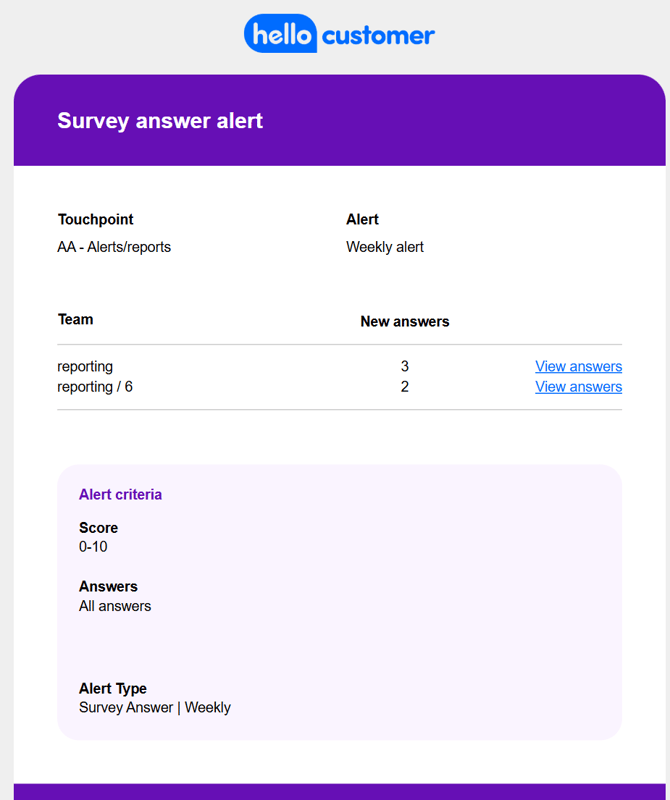
From now on, new survey answers alert emails will include team-specific details. You'll immediately see:
- Which teams triggered the alert.
- The number of responses per team.
- A direct link to conversations, pre-filtered for that team, when you click on view answers in the alert e-mail.
Release 28/01/2025
Did you feel like January lasted for ages? Don't worry, it gave us the opportunity to improve and strengthen the Hello Customer platform! As they say, good things come for those who wait. And since you waited patiently, new updates were released today!
Deleting touchpoints (with data)
New year, new resolutions. And with that, we are releasing a new functionality to get rid of those touchpoints you don't need anymore (only available for admin users). Tidy up the platform by removing all the touchpoints out of use. You can learn more about this functionality on this article.
Improved feedback on answer upload on the platform
We all make mistakes, but constructive criticism can be a great way of improving. That's why clearer error messages were added when an error occurs during the upload process of answers to the platform. Sure it will help you find the needle on the haystack that is a .csv file. You can find more information on the new messages here.
Improved messages on participant upload on the platform
Forgot something? A mandatory metadata key is not on your csv file. But which one? With the new error message appearing on the participant upload section, you will know exactly which one and correct it in no time. More information on the following article.
AA touchpoints with improved quarantine periods
We love feedback, but sometimes people need time to reflect on what they're sharing. With our improved quarantine periods for AA touchpoints, you can prevent multiple consecutive responses coming from the same device. After the quarantine period finishes, the participant will be granted access again to the survey. More on this here.
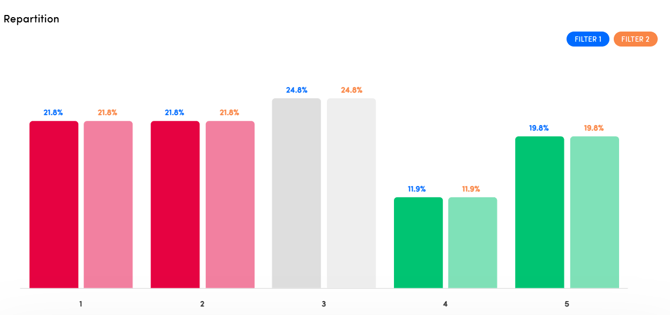
Improved Repartition visualization on the Analysis section
You don't know which data belongs to which filter? No worries, with the Analysis section's repartition score update, now the numbers on top of each bar will be the same as the colour of the filter, improving interpretation of the data displayed.
Release 19/11/2024
Want to track how many customers still need to be contacted? We’ve got you covered! Introducing the new Status Widget—a handy addition to your dashboard that keeps you informed at a glance.
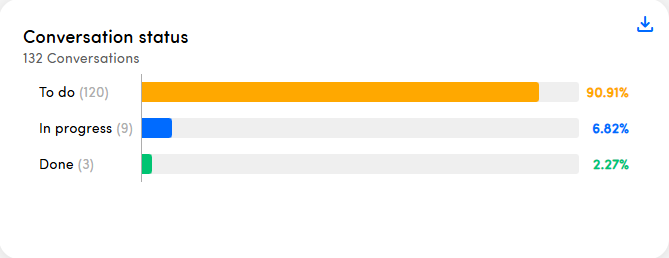
With this widget, you can instantly see how much work is still waiting for you, helping you stay on top of your tasks effortlessly. Add the widget to your dashboard today and stay in control!
Learn more about all the widgets you can add to your dashboards in this article.