
Welcome to Ask ISAAC — your smart companion for turning feedback into action.
Ask ISAAC is an intelligent analytics agent powered by over a decade of experience in Customer and Employee Experience (CX & EX). It dives deep into your data and gives you clear, actionable answers to your most pressing questions — whether they’re about customer satisfaction, employee sentiment, or your use of the Hello Customer platform itself.
Let’s get you started!
IN THIS ARTICLE
1. Setting Up Ask ISAAC for Success
2.1. Feedback insights
2.2. Evolutions over time
2.3. Strategic priorities
2.4. Metadata deep-dives
2.5. Experience metrics
2.6. ISAAC categories
2.7. Platform usage
3. Example Questions to Ask ISAAC
5. Ask Isaac available to every user (August 2026)
7. Usage Limits
8. Not Getting the Answers You Expected?
1. Setting Up Ask ISAAC for Success
To get the most out of Ask ISAAC, it’s important that your data is correctly mapped and labeled. Here’s how to configure your account:
-
Map your participant attributes
Navigate to the Participant Attribute Mapper in your Settings. Link your data fields to standard fields or define them as custom metadata so ISAAC knows exactly how to interpret them.
-
Add meaningful descriptions
Still in the Mapper, add clear and concise descriptions to your metadata fields. Make sure to explain what each field represents and, if possible, include example values. This helps ISAAC understand your data even better and answer your questions more accurately.
2. What Can I Ask ISAAC?
Here’s a taste of the kinds of questions ISAAC is built to answer:
2.1. Feedback insights
- “What are people saying about the freshness of our vegetables?”
2.2. Evolutions over time
- “What’s the most interesting trend in feedback over the past 6 months?”
2.3. Strategic priorities
- “What should be my first focus and what should I improve?”
2.4. Metadata deep-dives
- “How many people in Paris who bought Product A completed the survey?”
2.5. Experience metrics
- “How many customers in Paris gave a score above 3 in touchpoint Y?”
2.6. ISAAC categories
- “How has the mention of ‘personnel friendliness’ evolved over the last 3 months?”
2.7. Platform usage
- “How do I send out weekly reports from the Hello Customer platform?”
3. Example Questions to Ask ISAAC
Need inspiration? Here are some powerful ways to use ISAAC’s capabilities in your daily work:
- “Could you provide a report summarizing the key insights and trends for Q1 2025?”
- “What is the most impactful action I can take to convert dissatisfied customers into satisfied ones?”
- “For the NPS touchpoint, what are the main differences in customer feedback between January and February 2025?”
- “What negative feedback has been shared about personnel? Which specific areas require improvement?”
- “What is the most notable change or trend observed between Q1 and Q2 of 2025?”
- “Based on the insights, what should my top priority be right now?”
- “If we improved the speed of service, how much could we expect our NPS to increase?”
- “Looking at NPS Touchpoint 2, what have been the most significant shifts in top-mentioned categories over the past six months? What actions should I take in response?”
- “Based on customer feedback, how would you assess my performance across the six emotional drivers of customer experience?”
New: Questions using ISAAC’s CX Framework Analysis
ISAAC can now analyze verbatims and insights using three industry-standard CX frameworks. Here are examples of what you can ask:
Forrester CX Framework (Effectiveness, Ease, Emotion)
- "Did the customer get what they came for?"
- "Was the process simple or complicated for them?"
- "What emotions did the customer express during their interaction?"
Six Emotional Drivers Framework (Trust, Control, Progress, Recognition, Belonging, Surprise)
- "Which emotional drivers are present in this feedback?"
- "Did the customer mention feeling valued or surprised?"
Service Profit Chain Framework (Employee Experience → Customer Experience → Loyalty)
- "Is there any indication that employee behavior impacted the customer’s experience?"
- "Does the feedback suggest a connection between staff engagement and customer satisfaction?"
These examples show how ISAAC goes beyond simple metrics, giving you strategic guidance based on real feedback data.
4. Ask Isaac Update
Ask Isaac has had a full refresh in the 04/06/2026 release. The chat interface looks the same. What's changed is what happens behind it.
Better answers
Isaac is sharper across the board:
- More accurate. Better handling of multi-turn conversations and follow-up questions; fewer hallucinated numbers; more consistent reasoning across runs with the same data.
- More relevant. Isaac is better at picking the verbatims and metrics that actually explain the trend you're asking about, rather than the ones that just happen to match keywords.
- More concise. Answers go straight to the point. Long, rambling explanations are gone.
Sources for every answer
When Isaac answers a question, you'll now see exactly which data the answer is based on:
- Inline citations. Numbered markers (¹ ² ³ …) next to claims in the answer; click any one to jump to the source.
- Source panel. A panel on the right of the chat lists every source for the current answer, with the type (conversation, dashboard widget, metric, taxonomy node, …), a short snippet showing what Isaac used, and a direct link that opens the source in the platform with the right filters pre-applied.
- Hover preview. Hovering an inline citation shows the snippet without leaving the chat.
This makes verification quick: read the answer, click the citation next to anything you want to check, confirm in one click.
Anything else changing for end users?
- Permissions, chat history, and source-access scoping all behave exactly the same as before. Isaac never cites data you don't have access to.
- Existing chats are unaffected; the new behaviour applies from your next answer.
- If you don't see the refreshed Ask Isaac yet, the feature is enabled per tenant on request (contact your CSM).
Verify and feed back
The "show source" links make it quick to verify an answer. If something looks off, give the answer a thumbs-down — that feedback is what we use to keep tuning Isaac on your data.
5. Ask Isaac available to every user (August 2026)
Ask Isaac is no longer an admin-only feature. Any user in your environment can now open Ask Isaac and ask questions about your customer feedback provided their team has been granted access by an admin.
Answers stay strictly limited to the data that user's teams are allowed to see. Isaac never returns anything a user couldn't see themselves in the platform.
Who can use Ask Isaac?
Access is decided in two steps:
- Ask Isaac must be enabled for your tenant. This is the environment-wide switch. If Ask Isaac is off for your tenant, no one sees it. Contact your Customer Success Manager to enable it.
- Admins grant access per team. Once Ask Isaac is enabled, admins go to the team permissions panel and toggle the Ask Isaac permission for each team that should be able to use it. Users on teams without the permission don't see Ask Isaac in their menu.
Admins always have access to Ask Isaac as soon as it's enabled for the tenant.
For the step-by-step, see the Team permissions article.
What non-admin users see
- Ask Isaac appears in the menu the same way it does for admins.
- The chat, sources, and history behave the same way.
- Answers are automatically scoped to the user's team permissions. If a user is scoped to Region North only, Isaac's answers are calculated from Region North data always.
6. Managing Chats
You can create new chats to ask ISAAC different things while keeping topics isolated. You just need to click on "+ create chat" and a new chat will open, while the last chat will appear as a tab on the side panel with a representative title
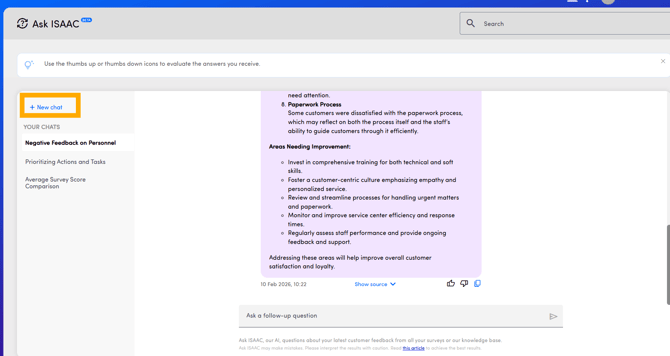
When hovering on top of each of the chat tabs you will find three dots.
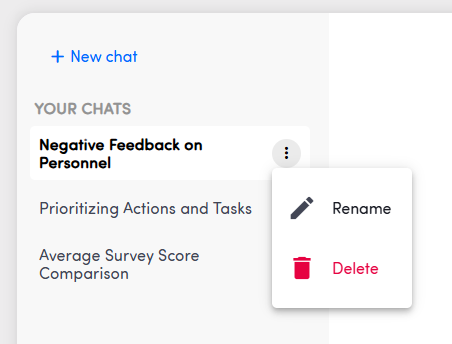
When clicked, you'll have the options:
-
Rename the chat
-
Delete the chat
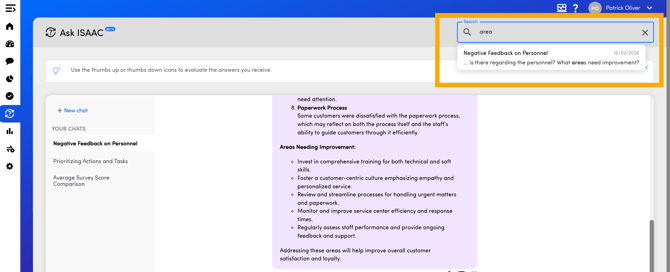
You can also use the search box to find chats with specific keywords, phrases... Which is very useful when you have a large amount of chats
7. Usage Limits
- Max 5 questions per minute
- Max 100 questions per day
8. Not Getting the Answer You Expected?
Ask ISAAC tries to interpret your question and automatically apply the right filters to your dataset based on touchpoints, metadata fields, categories, time periods, sentiments, and more.
IMPORTANT
In order to get proper answers, you need to provide descriptions to the metadata keys you use on the platform. This may not be necessary for the metadata keys that you don't use anymore and you're not interested in asking questions about to ISAAC.
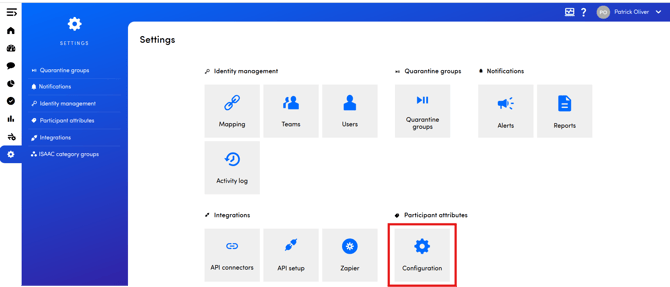
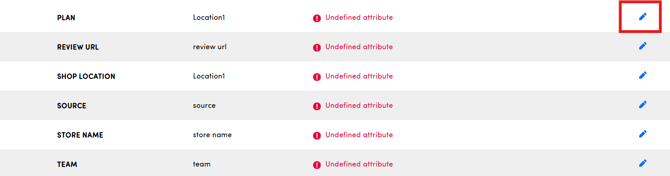

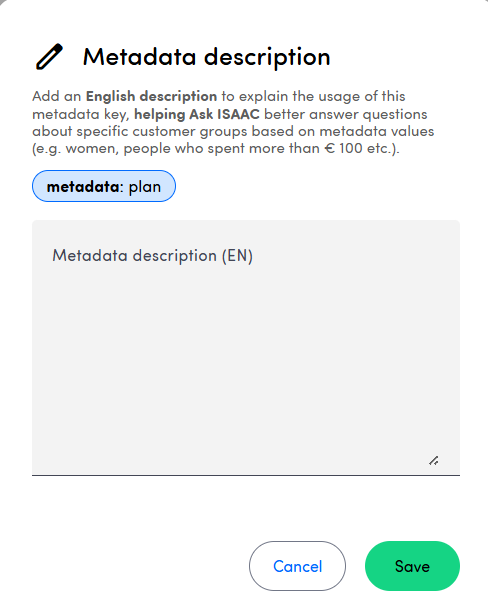
Sometimes ISAAC needs a little help.
For example, if you ask:
“How many customers talk about Nero?”
ISAAC will try to figure out if “Nero” is:
- a feedback category (e.g., product or service type),
- a metadata value (e.g., employee name),
- a touchpoint,
- or just a keyword in the raw feedback.
To make things easier for ISAAC, try clarifying your question:
“How many customers have value Nero in the ‘employees’ metadata field?”
TIP
Use the “Show Sources” button to see which filters ISAAC has applied based on your question. It’s a great way to troubleshoot and refine your search.