
In this article you can find information related to our recent releases.
1. Release 18/11/2025
- Manual upload within the platform
- Upload via our FTPs server
- Upload through an API call
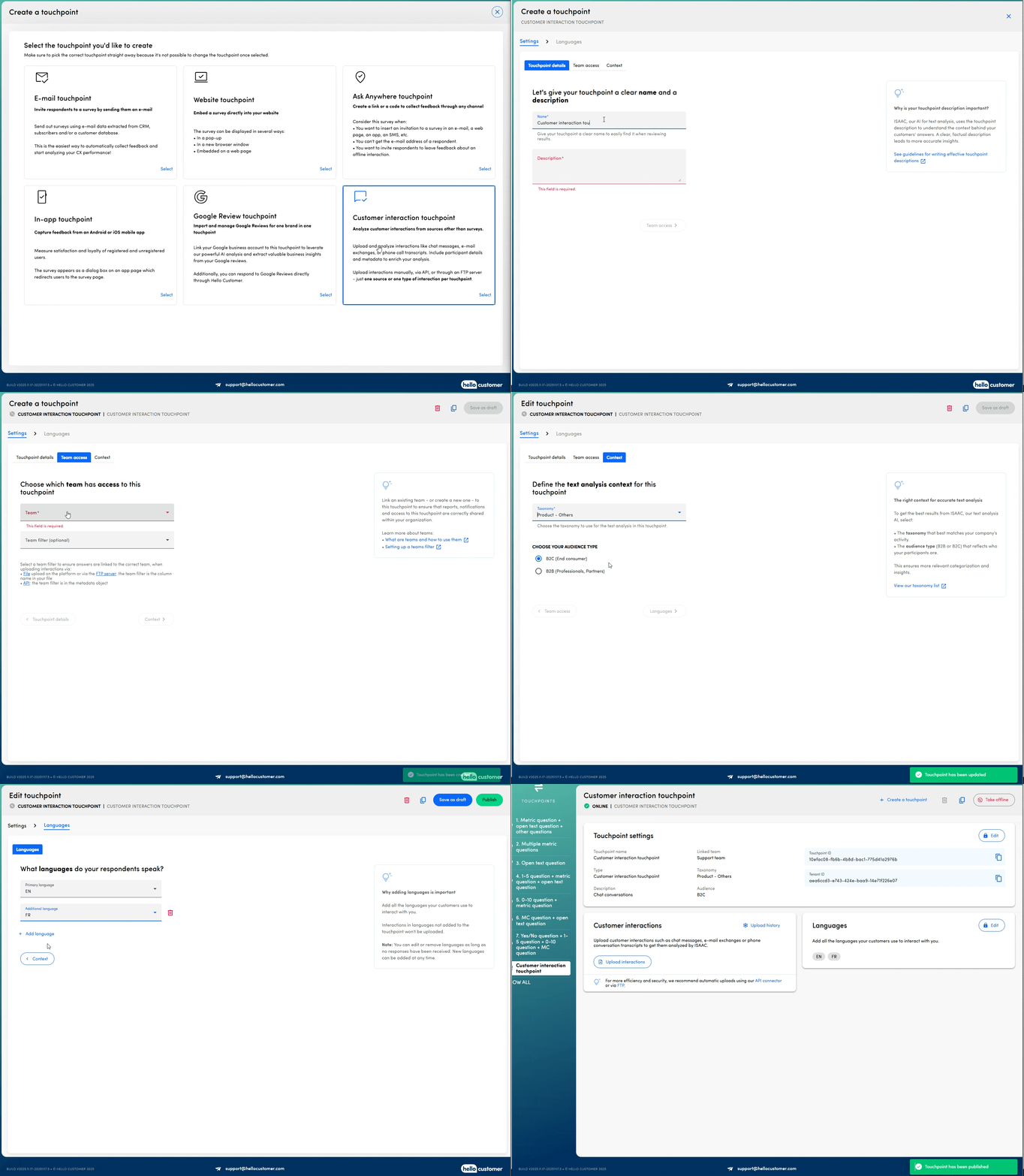
To create this new touchpoint type, it must first be activated within your environment, and you’ll need to be using the latest version of ISAAC. Please contact your Customer Success Manager or email support@hellocustomer.com for more information.
More information about this touchpoint can be found in this dedicated article.
API-driven team management
Managing your team structure no longer requires manual updates in the platform. With the latest API endpoints, you can now:
- Create new teams
- Remove teams
- Edit team names and aliases
- Adjust the parent team for organizational restructuring
- Retrieve a team’s permission settings
- Update permissions for any team
For complete guidance on leveraging these new APIs, please refer to our detailed article or explore our Postman collection.
2. Release 21/10/2025
We’ve made surveying even more flexible! You can now start your survey with any type of question!
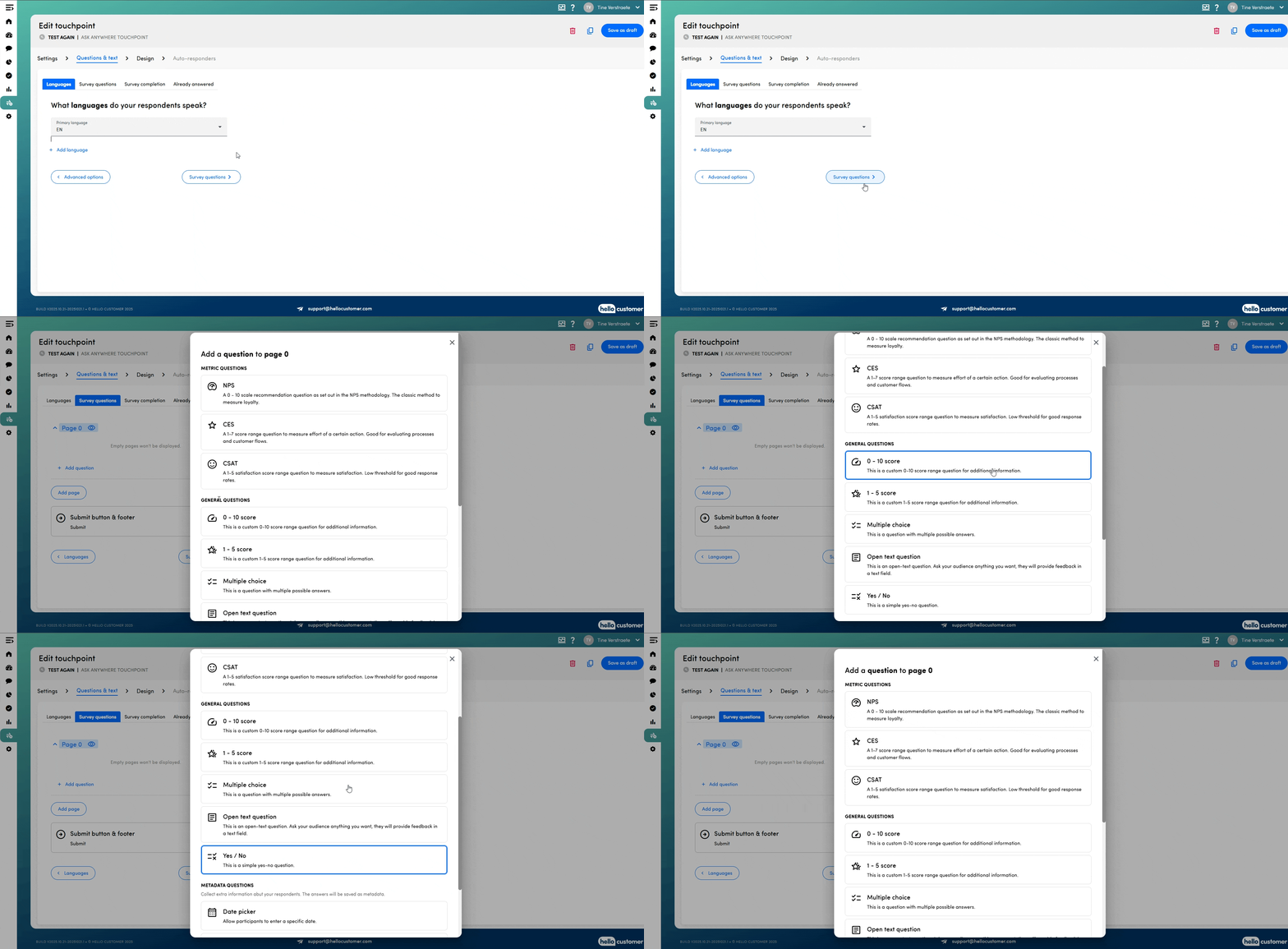
To use this feature, it must first be activated within your environment, and you’ll need to be using the latest version of ISAAC. Please contact your Customer Success Manager or email support@hellocustomer.com for more information.
3. Release 30/09/2025
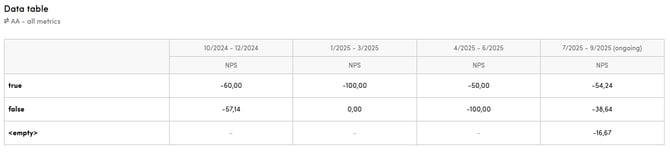
In our previous release, we introduced the data table as a new dashboard widget. Initially, you could only add answers from multiple-choice or yes/no questions as rows.
Moving forward, you can now include values for metadata keys in the rows as well. This enhancement enables you to analyse metrics such as NPS results and sentiment distribution per customer segment directly within the widget.
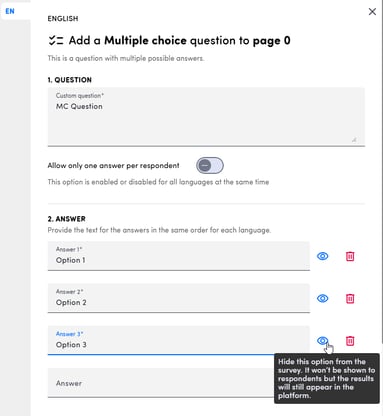
You can now hide an answer option in multiple-choice questions. When an option is hidden, participants will no longer be able to select it. However, the existing results for that option will remain visible in the platform, so you don’t lose past data.
Explore these new capabilities today!
4. Release 27/08/2025
Brace yourselves for some cool new features!
Data table
A new dashboard widget has arrived: the data table. With this widget, you can display results such as metrics, metric groups, sentiment spread, and totals—broken down per answer in a multiple-choice or yes/no question. You can also add evolution to compare different periods side by side.
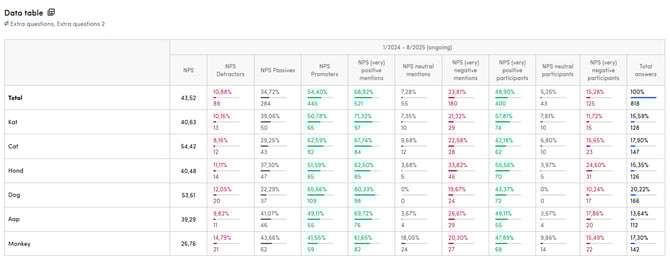
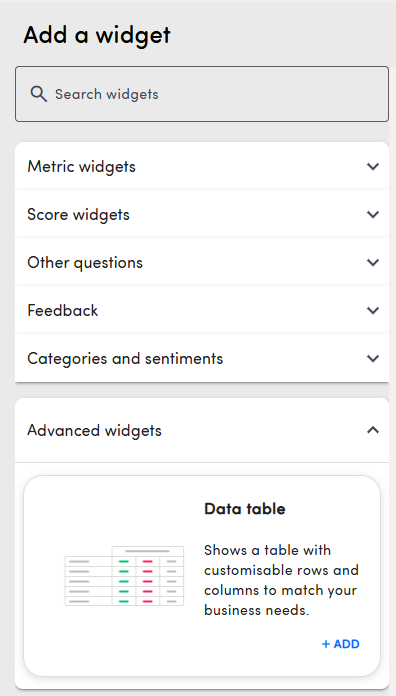
You’ll find this widget under “Advanced widgets” when adding a new dashboard or editing an existing one.
Google review touchpoint
To help you avoid duplicate work, replies added to Google reviews directly on Google or via another tool will now also appear in the Hello Customer platform. This way, you’ll immediately see which reviews already have a response and know when no further reply is needed.
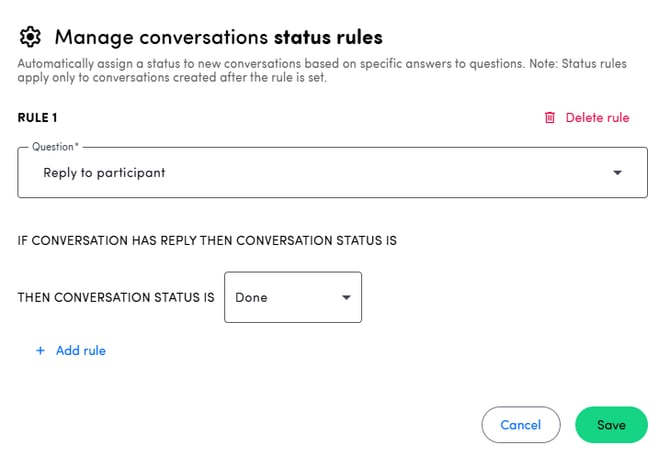
Conversation status rule
We’ve introduced a new conversation status rule! You can now define the status a conversation should receive once a reply has been added via the Hello Customer platform.
5. Release 03/07/2025
From now on, it is possible to contact your customers directly from the Hello Customer platform! In conversations, it's possible to send an email to a customer for which the email address is available:
- Configure your subject and email text
- Choose to include the logo and / or the original answer of the customer
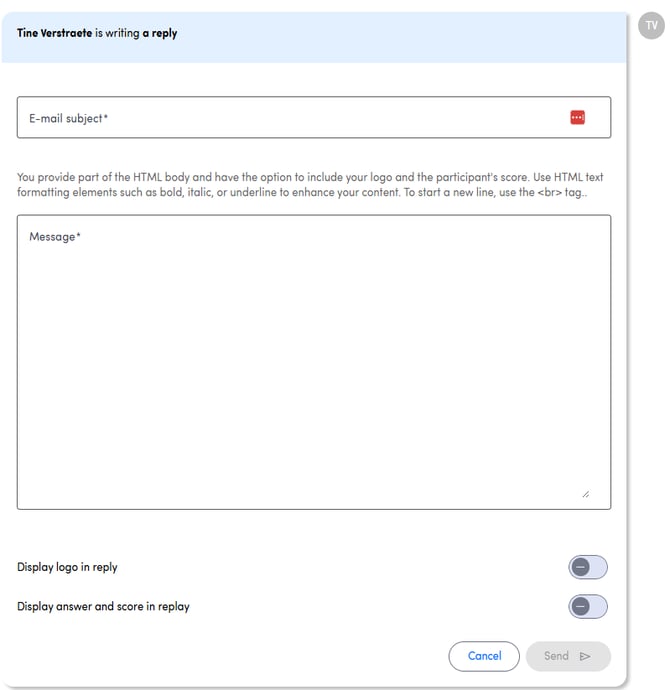
You can send as many emails to your customers as you like. If they reply to your emails, this will appear in the platform as well. More information about this feature can be found here.
Please note that replying to participants directly from conversations is only possible if this functionality is activated in your environment. Contact your customer success manager for more information.
6. Release 05/06/2025
This release includes a range of new features that we hope you’ll find both interesting and useful!
Google review touchpoint
This is a brand new type of touchpoint which will allow you to integrate your Google reviews in the Hello Customer platform. You can find all you need to know here.
In the near future, it will be possible to reply to the reviews directly from our platform, so stay tuned!
Ask ISAAC
This acclaimed feature is already here!
Ask ISAAC is an intelligent analytics agent which dives deep into your data and gives you clear, actionable answers to your most pressing questions. You can get all the insights on the Ask ISAAC article.
Reports and report mails
- Reports emails now support the Feedback widget.
- Also, the URL from the report email leads directly to the dashboard filtered for the team (if general dashboard filter is enabled)
- An updated version o the configuring page of reports has been implemented.
You can check all these changes here.
New API calls
Two new API calls have been added and can be used.
- Get Delivered - Retrieve a list of all participants who received a survey on a given period of time
- Get Quarantined participant - Check whether a participant is quarantined
You can check the detailed information on our API article.
7. Release 13/05/2025
We’ve made several powerful updates to our alert and report emails. Here’s what’s new:
Customizable Email Subjects
You can now fully customize the subject lines of alert and report emails. Tailor the subject to each user’s language to ensure clarity and relevance for every recipient.
Add dynamic fields and free text to personalize subjects
Improve open rates by making subject lines more descriptive and user-specific
Multilingual Support Expanded
Previously, our emails were only sent in English and French, even for users whose language was set to Dutch, German, Italian, Spanish, or Portuguese.
Now, emails will be sent in all supported user languages across the platform, ensuring a consistent and localized experience for everyone.
Dashboard Widgets in Report Emails
Make your report emails more actionable: you can now include selected dashboard widgets directly in the email body. Supported widgets:
- Metric scores (NPS, CSAT, CES)
- Top positive and negative categories
⚠️ The first three supported widgets from your dashboard will be included if you enable this functionality. Report content is always scoped to the recipient’s team permissions, so users only see data they’re authorized to access.
Try out these improvements and deliver clearer, more impactful emails to your users!
8. Release 04/03/2025
We’re rolling out some powerful new features to make your workflow smoother and your insights even more actionable. From multi-touchpoint dashboards to enhanced survey validity settings and improved alert emails, these updates are designed to give you more control and flexibility. Let’s dive in!
Dashboards for Multiple Touchpoints
You can now set up dashboards that display data from multiple touchpoints! This feature is useful in several scenarios:
-
Compare multiple touchpoints in one dashboard:
For example, if you want to analyze a customer journey, you can add widgets for different touchpoints and compare their scores side by side.
-
Combine data from various sources:
If you’re using an "Ask Anywhere" touchpoint to upload historical data and collecting new responses through an email touchpoint, you can now consolidate this information into a single dashboard.
Learn how to create a dashboard for multiple touchpoints here.
Survey Validity Setting
With the new survey validity feature, you can define how long participants have to complete a survey after receiving the e-mail invitation. The validity period can be set between 1 day and 6 months.
During the validity period:
- Participants can start filling out the survey.
-
If they don’t complete it in one go, they can reopen it and continue at a later time.
Please note that if partial answers are shown in the platform, the date on which the answers are shown might be adjusted if a participant continues the survey on a later date, since the full survey will always be shown on the latest answer date.
- Additionally, if the score adjustment feature is enabled, participants who have already submitted their responses can still update their answers within the validity period. If this feature is disabled, submitted responses remain final.
Teams in Alert Emails
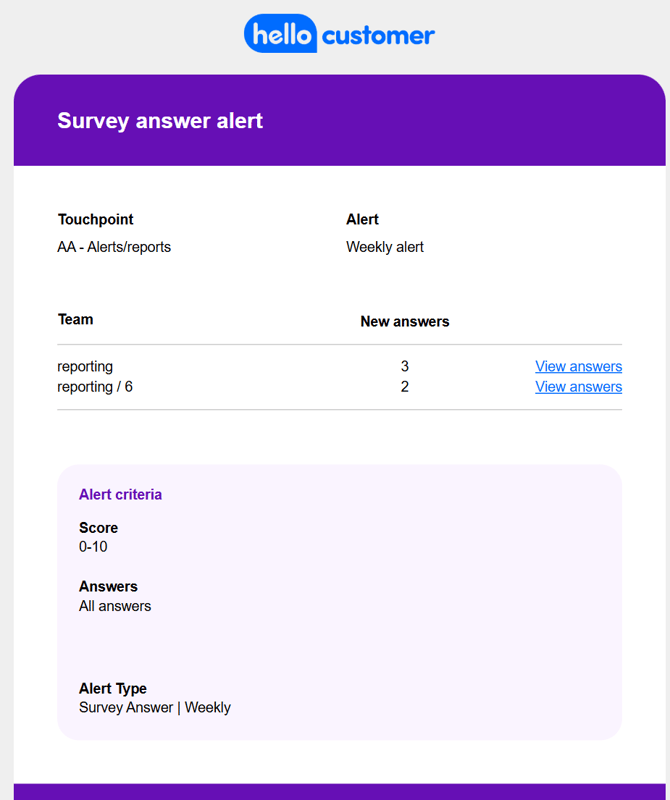
From now on, new survey answers alert emails will include team-specific details. You'll immediately see:
- Which teams triggered the alert.
- The number of responses per team.
- A direct link to conversations, pre-filtered for that team, when you click on view answers in the alert e-mail.
9. Release 28/01/2025
Did you feel like January lasted for ages? Don't worry, it gave us the opportunity to improve and strengthen the Hello Customer platform! As they say, good things come for those who wait. And since you waited patiently, new updates were released today!
Deleting touchpoints (with data)
New year, new resolutions. And with that, we are releasing a new functionality to get rid of those touchpoints you don't need anymore (only available for admin users). Tidy up the platform by removing all the touchpoints out of use. You can learn more about this functionality on this article.
Improved feedback on answer upload on the platform
We all make mistakes, but constructive criticism can be a great way of improving. That's why clearer error messages were added when an error occurs during the upload process of answers to the platform. Sure it will help you find the needle on the haystack that is a .csv file. You can find more information on the new messages here.
Improved messages on participant upload on the platform
Forgot something? A mandatory metadata key is not on your csv file. But which one? With the new error message appearing on the participant upload section, you will know exactly which one and correct it in no time. More information on the following article.
AA touchpoints with improved quarantine periods
We love feedback, but sometimes people need time to reflect on what they're sharing. With our improved quarantine periods for AA touchpoints, you can prevent multiple consecutive responses coming from the same device. After the quarantine period finishes, the participant will be granted access again to the survey. More on this here.
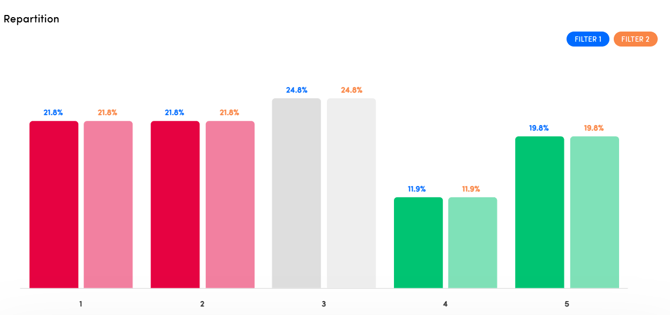
Improved Repartition visualization on the Analysis section
You don't know which data belongs to which filter? No worries, with the Analysis section's repartition score update, now the numbers on top of each bar will be the same as the colour of the filter, improving interpretation of the data displayed.
10. Release 19/11/2024
Want to track how many customers still need to be contacted? We’ve got you covered! Introducing the new Status Widget—a handy addition to your dashboard that keeps you informed at a glance.
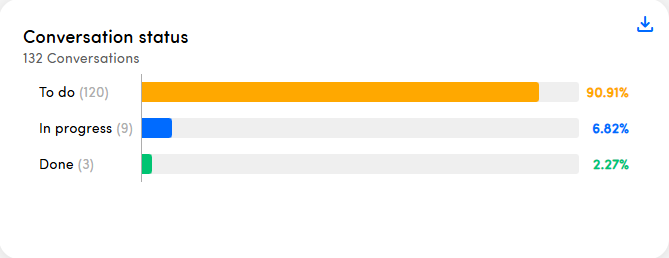
With this widget, you can instantly see how much work is still waiting for you, helping you stay on top of your tasks effortlessly. Add the widget to your dashboard today and stay in control!
Learn more about all the widgets you can add to your dashboards in this article.