
As described in this article, you need to link your touchpoint to a team. This way, the information can easily be distributed and linked to the right level within your team structure.
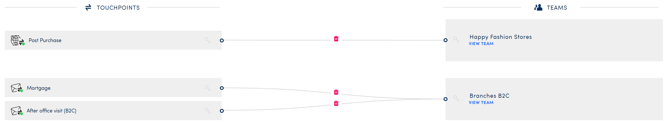
When you initially map out your touchpoints and teams all lines between them are grey and have a red bin icon. At this point, it's still perfectly possible to disconnect the team or to link the touchpoint to another team.
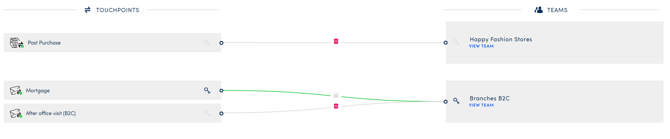
Once you've uploaded a respondent - in case of an e-mail touchpoint - or your first answer came in, the line between the touchpoint and team will become green. Now it's impossible to disconnect them from this part of the platform because data was added to your touchpoint.
NOTE
If you've made a mistake in mapping, you can go to the touchpoint, put it offline and unlink the team from there.
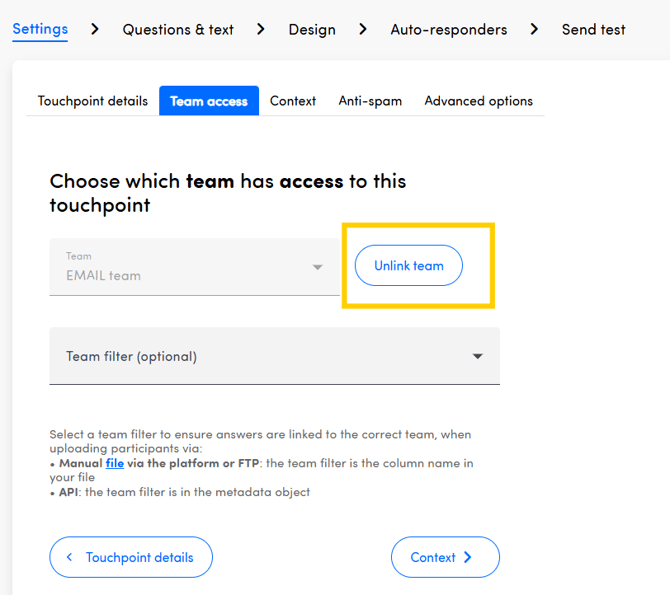
You can link a new team and after selecting a team filter, new units (teams) will be created the next day and the conversations will automatically be assigned to them after the day after the units are created.
Keep in mind that the link between the touchpoint and team is created based on the metadata key you fill out as Team Filter in the Team Access tab of Settings when configuring a touchpoint. Learn more about it here.